JISAの第4回技術コンテストに参加してみた
2025年12月09日作成
2026年01月14日更新
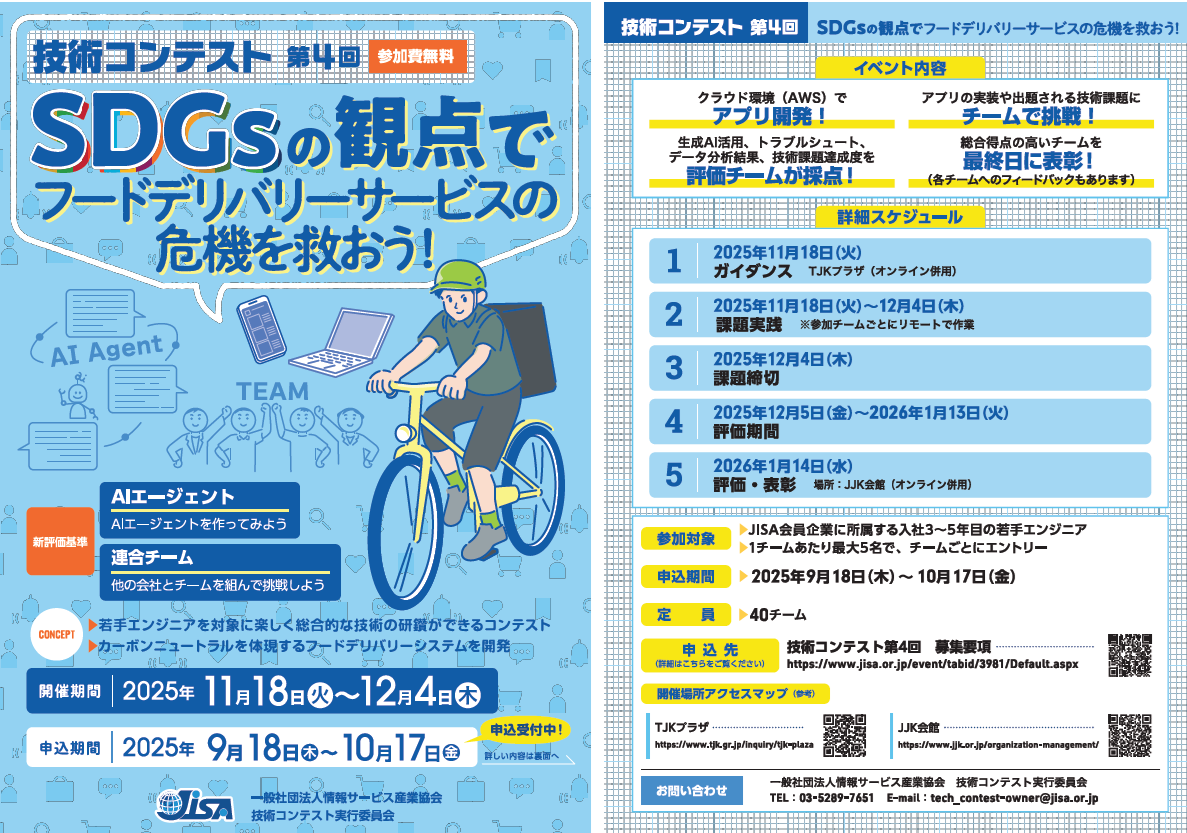
JISAとは?
一般社団法人情報サービス産業協会(Japan Information Technology Services Industry Association)の頭文字をいくつかとってJISAだそうです。
第4回技術コンテストについて
JISAが主催する技術コンテストで、社会人歴3~5年目のIT技術者を集めて5人1組のチームを結成し、課題解決を行います。開催期間は2週間程度で、毎年約30社が参加するようです。私は初参加で、会社の同期と後輩とチームを組み参加しました。会社としての参加は初めてではないようです。
私の担当した課題内容1 クラウド
AWS CloudFormationを用いてAWSインフラストラクチャーを構築する課題でした。AWS CDKを業務で少しかじっており、プライベートでもAWSを使用している私にはとても簡単でした。採点結果100/100点(採点サイトがあり、その場で直ぐに採点してくれます。複数回回答可能で合否だけ出ます。)
AWSTemplateFormatVersion: '2010-09-09'
Description: 'Cloud Level 3 - Application Stack'

# =========================================================
# ⚠️ 編集禁止セクション ここから
# =========================================================
Mappings:
  GlobalSettings:
    defaults:
      StageName: 'api'
      SourceBucket: 'jisa2025-cloud-lambda-src'
      LambdaS3Key: 'cloud-lv3-lambda.zip'
      IndexModifierS3Key: 'modify_html.zip'
      SourceKey: 'index.html'
# =========================================================
# ⚠️ 編集禁止セクション ここまで
# =========================================================

Resources:
  # S3 Bucket for Website Hosting
  SiteBucket:
    Type: AWS::S3::Bucket
    Properties:
      # ⚠️ BucketName 編集禁止
      BucketName: !Sub "${AWS::StackName}-website-${AWS::AccountId}"
      PublicAccessBlockConfiguration:
        BlockPublicAcls: true
        BlockPublicPolicy: true
        IgnorePublicAcls: true
        RestrictPublicBuckets: true
      CorsConfiguration:
        CorsRules:
          - AllowedHeaders:
              - '*'
            AllowedMethods:
              - GET
              - HEAD
            AllowedOrigins:
              - '*'
            MaxAge: 3000

  # S3 Bucket Policy
  SiteBucketPolicy:
    Type: AWS::S3::BucketPolicy
    Properties:
      Bucket: !Ref SiteBucket
      PolicyDocument:
        Version: '2012-10-17'
        Statement:
          - Sid: AllowOnlyFromCloudFrontOAC
            Effect: Allow
            Principal:
              Service: cloudfront.amazonaws.com
            Action: 's3:GetObject'
            Resource: !Sub "arn:aws:s3:::${SiteBucket}/*"
            Condition:
              StringEquals:
                AWS:SourceArn: !Sub "arn:aws:cloudfront::${AWS::AccountId}:distribution/${SiteDistribution}"

  # DynamoDB Table
  ItemsTable:
    Type: AWS::DynamoDB::Table
    Properties:
      # ⚠️ TableName 編集禁止
      TableName: !Sub "${AWS::StackName}-table"
      # ⚠️ AttributeDefinitions 編集禁止
      AttributeDefinitions:
        - AttributeName: id
          AttributeType: S
      # ⚠️ KeySchema 編集禁止
      KeySchema:
        - AttributeName: id
          KeyType: HASH
      # ⚠️ BillingMode 編集禁止
      BillingMode: PAY_PER_REQUEST

  # Lambda Execution Role
  LambdaExecutionRole:
    Type: AWS::IAM::Role
    Properties:
      # ⚠️ RoleName 編集禁止
      RoleName: !Sub "${AWS::StackName}-lambda-role"
      AssumeRolePolicyDocument:
          Version: "2012-10-17"
          Statement:
              - Effect: Allow
                Principal:
                    Service: lambda.amazonaws.com
                Action: "sts:AssumeRole"
      # ⚠️ Tags 編集禁止
      Tags:
        - Key: Category
          Value: cloud-lv3
      ManagedPolicyArns:
        - 'arn:aws:iam::aws:policy/service-role/AWSLambdaBasicExecutionRole'
        - 'arn:aws:iam::aws:policy/AmazonDynamoDBFullAccess'

  # Lambda Function
  ItemsFunction:
    Type: AWS::Lambda::Function
    Properties:
      # ⚠️ FunctionName 編集禁止
      FunctionName: !Sub "${AWS::StackName}-lambda-function"
      Runtime: nodejs22.x
      Handler: index.handler
      # ⚠️ Role 編集禁止
      Role: !GetAtt LambdaExecutionRole.Arn
      # ⚠️ Code 編集禁止
      Code:
        S3Bucket: !FindInMap [GlobalSettings, defaults, SourceBucket]
        S3Key: !FindInMap [GlobalSettings, defaults, LambdaS3Key]
      Timeout: 10
      MemorySize: 128
      Environment:
        Variables:
          ITEMS_TABLE: "jisa2025-cloud-lv3-table"

  # API Gateway REST API
  ApiGateway:
    Type: AWS::ApiGateway::RestApi
    Properties:
      # ⚠️ Name 編集禁止
      Name: !Sub "${AWS::StackName}-api"
      Description: API for cloud-lv3 application
      EndpointConfiguration:
        Types:
          - REGIONAL

  # API Gateway Resource
  ApiResource:
    Type: AWS::ApiGateway::Resource
    Properties:
      RestApiId: !Ref ApiGateway
      ParentId: !GetAtt ApiGateway.RootResourceId
      # ⚠️ PathPart 編集禁止
      PathPart: 'items'

  # API Gateway Method - POST
  ApiMethodPost:
    Type: AWS::ApiGateway::Method
    Properties:
      RestApiId: !Ref ApiGateway
      ResourceId: !Ref ApiResource
      HttpMethod: POST
      AuthorizationType: NONE
      Integration:
        Type: AWS_PROXY
        IntegrationHttpMethod: POST
        Uri: !Sub "arn:aws:apigateway:${AWS::Region}:lambda:path/2015-03-31/functions/${ItemsFunction.Arn}/invocations"

  # API Gateway Method - GET (vulnerable template: keep CORS/OPTIONS missing)
  ApiMethodGet:
    Type: AWS::ApiGateway::Method
    Properties:
      RestApiId: !Ref ApiGateway
      ResourceId: !Ref ApiResource
      HttpMethod: GET
      AuthorizationType: NONE
      Integration:
        Type: AWS_PROXY
        IntegrationHttpMethod: POST
        Uri: !Sub "arn:aws:apigateway:${AWS::Region}:lambda:path/2015-03-31/functions/${ItemsFunction.Arn}/invocations"

  ApiMethodOptions:
    Type: AWS::ApiGateway::Method
    Properties:
      RestApiId: !Ref ApiGateway
      ResourceId: !Ref ApiResource
      HttpMethod: OPTIONS
      AuthorizationType: NONE
      Integration:
        Type: MOCK
        RequestTemplates:
          application/json: '{"statusCode":200}'
        IntegrationResponses:
          - StatusCode: 200
            ResponseParameters:
              method.response.header.Access-Control-Allow-Origin: "'*'"
              method.response.header.Access-Control-Allow-Headers: "'Content-Type'"
              method.response.header.Access-Control-Allow-Methods: "'GET,POST,OPTIONS'"
      MethodResponses:
        - StatusCode: 200
          ResponseParameters:
            method.response.header.Access-Control-Allow-Origin: true
            method.response.header.Access-Control-Allow-Headers: true
            method.response.header.Access-Control-Allow-Methods: true

  # API Gateway Deployment
  ApiDeployment:
    Type: AWS::ApiGateway::Deployment
    DependsOn:
      - ApiMethodPost
      - ApiMethodGet
    Properties:
      RestApiId: !Ref ApiGateway
      StageName: !FindInMap [GlobalSettings, defaults, StageName]

  # Lambda Permission for API Gateway
  LambdaPermission:
    Type: AWS::Lambda::Permission
    Properties:
      Action: lambda:InvokeFunction
      FunctionName: !Ref ItemsFunction
      Principal: apigateway.amazonaws.com
      SourceArn: !Sub "arn:aws:execute-api:${AWS::Region}:${AWS::AccountId}:${ApiGateway}/*/*/*"

  # CloudFront Distribution For S3 Website
  SiteDistribution:
    Type: AWS::CloudFront::Distribution
    Properties:
      DistributionConfig:
        Comment: !Sub "S3 CloudFront Distribution for ${AWS::StackName}"
        Origins:
          - DomainName: !GetAtt SiteBucket.RegionalDomainName
            Id: S3Origin
            OriginAccessControlId: !GetAtt CloudFrontOriginAccessControl.Id
            S3OriginConfig: {}
        Enabled: true
        # ⚠️ DefaultRootObject 編集禁止
        DefaultRootObject: index.html
        DefaultCacheBehavior:
          TargetOriginId: S3Origin
          ViewerProtocolPolicy: redirect-to-https
          AllowedMethods:
            - GET
            - HEAD
            - OPTIONS
          CachedMethods:
            - GET
            - HEAD
            - OPTIONS
          ForwardedValues:
            QueryString: false
            Headers:
              - Origin
            Cookies:
              Forward: none
        PriceClass: PriceClass_100
        HttpVersion: http2
        ViewerCertificate:
          CloudFrontDefaultCertificate: true

  # CloudFront Distribution specifically for the API Gateway
  ApiCloudFrontDistribution:
    Type: AWS::CloudFront::Distribution
    Properties:
      DistributionConfig:
        Comment: !Sub "API CloudFront Distribution for ${AWS::StackName}"
        Origins:
          - DomainName: !Sub "${ApiGateway}.execute-api.${AWS::Region}.amazonaws.com"
            Id: ApiOriginDirect
            CustomOriginConfig:
              HTTPPort: 80
              HTTPSPort: 443
              OriginProtocolPolicy: https-only
            OriginPath: !Sub "/api"
        Enabled: true
        DefaultCacheBehavior:
          TargetOriginId: ApiOriginDirect
          ViewerProtocolPolicy: https-only
          AllowedMethods:
            - GET
            - HEAD
            - OPTIONS
            - POST
            - PUT
            - PATCH
            - DELETE
          CachedMethods:
            - GET
            - HEAD
          ForwardedValues:
            QueryString: true
            Headers:
              - Origin
              - Content-Type
              - Access-Control-Request-Headers
              - Access-Control-Request-Method
            Cookies:
              Forward: none
          MinTTL: 0
          DefaultTTL: 0
          MaxTTL: 0
        PriceClass: PriceClass_100
        HttpVersion: http2
        ViewerCertificate:
          CloudFrontDefaultCertificate: true

    # CloudFront Origin Access Control (OAC)
  CloudFrontOriginAccessControl:
    Type: 'AWS::CloudFront::OriginAccessControl'
    Properties:
      OriginAccessControlConfig:
        Name: !Sub "${AWS::StackName}-OAC"
        OriginAccessControlOriginType: s3
        SigningBehavior: always
        SigningProtocol: sigv4


# =========================================================
# ⚠️ 編集禁止セクション ここから
# =========================================================
  # IAM Role for the Custom Resource Lambda that will copy/modify index.html
  IndexModifierRole:
    Type: AWS::IAM::Role
    Properties:
      RoleName: !Sub "${AWS::StackName}-index-modifier-role"
      AssumeRolePolicyDocument:
        Version: '2012-10-17'
        Statement:
          - Effect: Allow
            Principal:
              Service: lambda.amazonaws.com
            Action: 'sts:AssumeRole'
      ManagedPolicyArns:
        - arn:aws:iam::aws:policy/service-role/AWSLambdaBasicExecutionRole
      Policies:
        - PolicyName: IndexModifierS3Access
          PolicyDocument:
            Version: '2012-10-17'
            Statement:
              - Effect: Allow
                Action:
                  - s3:GetObject
                  - s3:PutObject
                  - s3:DeleteObject
                Resource: !Sub "arn:aws:s3:::${SiteBucket}/*"
              - Effect: Allow
                Action:
                  - s3:GetObject
                Resource:
                  - !Sub
                    - "arn:aws:s3:::${SourceBucket}/*"
                    - { SourceBucket: !FindInMap [GlobalSettings, defaults, SourceBucket] }

  # Lambda function to write index.html with API domain embedded
  IndexModifierFunction:
    Type: AWS::Lambda::Function
    Properties:
      FunctionName: !Sub "${AWS::StackName}-index-modifier"
      Runtime: nodejs22.x
      Handler: index.handler
      Role: !GetAtt IndexModifierRole.Arn
      Code:
        S3Bucket: !FindInMap [GlobalSettings, defaults, SourceBucket]
        S3Key: !FindInMap [GlobalSettings, defaults, IndexModifierS3Key]
      Timeout: 60
      MemorySize: 128

  IndexModifierCustomResource:
    Type: Custom::IndexModifier
    Properties:
      ServiceToken: !GetAtt IndexModifierFunction.Arn
      ApiCloudFrontDomain: !GetAtt ApiCloudFrontDistribution.DomainName
      SiteBucket: !Ref SiteBucket
      IndexKey: 'index.html'
      SourceBucket: !FindInMap [GlobalSettings, defaults, SourceBucket]
      SourceKey: !FindInMap [GlobalSettings, defaults, SourceKey]

Outputs:
  S3CloudFrontDistributionURL:
    Description: CloudFront URL for accessing static website hosted on S3
    Value: !Sub "https://${SiteDistribution.DomainName}"

  ApiCloudFrontDistributionURL:
    Description: CloudFront URL for API CloudFront distribution fronting a Lambda-integrated API Gateway
    Value: !Sub "https://${ApiCloudFrontDistribution.DomainName}"

  DynamoDBTableName:
    Description: Name of the DynamoDB table
    Value: !Ref ItemsTable

  ApiRestApiId:
    Description: RestApiId for the API Gateway
    Value: !Ref ApiGateway

  ApiStageName:
    Description: Stage name used by the API deployment
    Value: !FindInMap [GlobalSettings, defaults, StageName]

  ApiCloudFrontDomain:
    Description: DomainName of ApiCloudFrontDistribution (if present)
    Value: !GetAtt ApiCloudFrontDistribution.DomainName

# =========================================================
# ⚠️ 編集禁止セクション ここまで
# =========================================================
私の担当した課題内容2 devops
GitlabのCI/CDを用いて継続的インテグレーションとデリバリーのパイプラインを構築する課題でした。こちらの課題は、ゼロベースで何か作るのではなく、事前にある程度やるべき事が示されており、細やかな設定を自分で考えるような課題です。不親切な手順書を見ながら、パイプラインを構築するイメージです。こちらも、パイプラインを作成した事はなかったのですが、いつもリリースなどで利用している側でしたので最低限の仕組みは理解しており、難なくクリア出来ました。採点結果100/100点(採点サイトがあり、その場で直ぐに採点してくれます。複数回回答可能で合否だけ出ます。)
stages:
    - build
    - lint
    - test
    - deploy

build-backend:
    stage: build
    tags: ["build"]
    script:
        # 依存インストール
        - pip install -r requirements.txt
        # 環境変数ファイル生成
        - echo "ENV_TYPE=server" > .env
        - echo "AWS_REGION=us-west-2" >> .env
        # パッケージング
        - tar czf backend.tar.gz . || true
    artifacts:
        paths:
            - backend.tar.gz

deploy-production:
    stage: deploy
    tags: ["build"]
    script:
        - export GIT_SSH_COMMAND="ssh -o StrictHostKeyChecking=no -o UserKnownHostsFile=/dev/null"
        - scp -o StrictHostKeyChecking=no -o UserKnownHostsFile=/dev/null backend.tar.gz production:/var/tmp/
        - ssh -o StrictHostKeyChecking=no -o UserKnownHostsFile=/dev/null production "
          sudo systemctl stop nttdata-dashboard-backend &&
          tar xzf /var/tmp/backend.tar.gz -C /usr/local/share/applications/nttdata-be/ --strip-components=1 &&
          if [ -f /usr/local/share/applications/nttdata-be/jisa-gunicorn.conf.py ]; then
          ln -sf /usr/local/share/applications/nttdata-be/jisa-gunicorn.conf.py /usr/local/share/applications/nttdata-be/nttdata-gunicorn.conf.py;
          fi &&
          sudo systemctl start nttdata-dashboard-backend
          "
    only:
        - main

lint-backend:
    stage: lint
    tags: ["build"]
    script:
        - pip install -r requirements.txt
        - black --check ./src || true

test-backend:
    stage: test
    tags: ["build"]
    script:
        - pip install -r requirements.txt --user
        - export PATH=$PATH:~/.local/bin
        - pytest || true

deploy-staging:
    stage: deploy
    tags: ["build"]
    script:
        - export GIT_SSH_COMMAND="ssh -o StrictHostKeyChecking=no -o UserKnownHostsFile=/dev/null"
        - scp -o StrictHostKeyChecking=no -o UserKnownHostsFile=/dev/null backend.tar.gz staging:/var/tmp/
        - ssh -o StrictHostKeyChecking=no -o UserKnownHostsFile=/dev/null staging "
          sudo systemctl stop nttdata-dashboard-backend &&
          tar xzf /var/tmp/backend.tar.gz -C /usr/local/share/applications/nttdata-be/ --strip-components=1 &&
          if [ -f /usr/local/share/applications/nttdata-be/jisa-gunicorn.conf.py ]; then
          ln -sf /usr/local/share/applications/nttdata-be/jisa-gunicorn.conf.py /usr/local/share/applications/nttdata-be/nttdata-gunicorn.conf.py;
          fi &&
          sudo systemctl start nttdata-dashboard-backend
          "
    only:
        - develop
私の担当した課題内容3 ミドルウェア
こちらは他のメンバーの担当でしたが、期限内に終わらなそうだったのでお手伝いしました。nginxの設定ファイルを修正して、特定条件下のBasic認証を導入せよという課題でした。これが一番苦労しました。
専門学生時代のポートフォリオのバックエンドで使用した事はあるものの4年以上前かつ、コピペでの実装だったのであまり詳しくなくnginxの設定内容を彷徨ってしまいました。採点結果50/50点(採点サイトがあり、その場で直ぐに採点してくれます。複数回回答可能で合否だけ出ます。)
チームとしての結果は4位!得点は897/900点!
1位 900点
2位 898点
3位 898点(同率2位)
4位 897点←ココ!
1~3位が表彰されるので、ギリギリ表彰対象外となりました。2位と3位が同率で898点。あと1点取れれば同率で入賞していました。1点で入賞を逃しました。本当に悔しいです。ちなみに去年の順位は9位でした。